
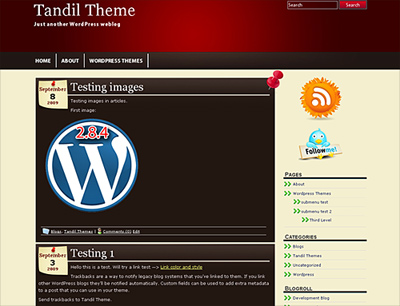
Tandil is a very good looking WordPress theme with a stylish and elegant design. It can be used for any niche and is compatible with the latest WordPress version. Tandil includes Theme Options, you can set your own RSS and Twitter accounts, among other features. The Theme supports Threaded Comments, Sticky Post, etc. It’s optimized for SEO and 100% Valid Code CSS level 2.1 and XHTML 1.0 Transitional. You can visit the Tandil Homepage Here and check this new and cool WP Theme!
Download Tandil Theme
I can offer basic support below or via email, but if you are looking for something like a site’s customization, I suggest you hire me. I try to answer a couple of emails every day. Thank you.


Pingback: Patagonia Theme and Wordpress MU | Wp Themes Planet
Is there a way I can take out the Little note that has the date and a thumb tack on it?
Steve,
sborthsfsL (at) msn (dot) com
Sure Steve. I will contact you there. Greetings, Alex.
Thanks so much for all your help Alex. Got another question for you. I have created a link in the sidebar w/ an associated picture for that link. The problem is that the link starts out to the right of the picture & finishes below the picture which make it look kind of funky. How do I get the link completely under the picture? Again, thanks in advance for all your help
http://www.tedheims.com
Also, I’m interested in installing your recent update but fear it may blow out the settings you did for me previously. Any ideas?
Ted
Hello Ted, contacted you via email. Greetings, Alex.
I’m new to this, so I’m sure I have just missed this somewhere, but I need to know how to change the color on my posts. With the Tandil theme, which is perfect for my company color scheme, my posts don’t have enuf contrast with the background and are hard to read. I would just like to change to a pure white.
I contacted you Clare, cheers, Alex.
Hi, Alex
Just downloaded your Tandil wordpress template to create my blog. It looks really cool. I can’t find the place to edit the title of the blog at the top – could you pls help me with that?
Thanks by advance,
Olivier
Hello Olivier, just go to settings -> general. There you can edit your blog title. Cheers, Alex.
The Tandil Themes is awesome!
Great Theme!!! I am new to WordPress and have a couple of questions about your theme.
First – is there any way to edit the Header to include a logo or picture of some kind?I would like to be able to edit the top of the page – not just the test.
Next – and I might be missing something basic due to lack of experiance – Is there a way to insert graphis on the side of the page – for advertising blocks?
Thanks – I think I am going to get you a cup of coffee after I get paid.
Take care – Keith
Hello Keith, sure! This can be done. I’m contacting you. Alex.
Hey Alex.. love the Tandil theme. I’m just exporting an old wordpress.com blog to my own page, and have a couple of things left to do (namely, work on a header that makes sense)… but, my question for you is this…
I can’t seem to find the setting in the CSS that determines the color and make-up of the “quote” in a post. I’d like to tweak the font layout a little within the quote, maybe italics, maybe something else… but can’t seem to find it.. Can you help me out?
Thanks again, bro. Good stuff..
-F
Hello Frank! Thank you! No problem, you will need to edit some parts of the style.css. I will let you know. Good luck, Alex.
Hey Alex. Huge Tandil fan. I have two questions:
1) Is there a way to make the theme operate so that when you post a long post it will excerpt it on the home page, and then have a “read more” sort of button to read the rest? I tried creating a manual excerpt in the WordPress admin, but that did not seem to work.
2) I want to put a disclaimer page on my site, but I don’t want it displayed in the menu, just as a link from the footer. I understand how to link from footer.php, but how do I make it so that the page I make in wordpress does not show up in the horizontal theme menu?
Thanks in Advance!
Hello Kevin, yes I think we can find a way to do this, will try to reach you via email. Good luck, Alex.
I am using this theme and I tried many others and love this one the most (new to wordpress) … I’ve taken the picture with the thumbtack off, but can’t seem to change the date format. I would like it to go across the top of my posts in a straight line, as opposed to the left [centered]. Is there away for me to change the look of the date/month?
Thanks,
Tee
Just puzzled as to why the date is stuck at 24th May? I tried reinstalling the theme but that didn’t work, any ideas?
Thanks
Graham Paris
Hello Graham, in wordpress, when you create a new post, the date you see, is the date when the post was created and eventually posted. It’s the idea of a blog, to save articles by date. Good luck! Alex.
Pingback: Themes updated for Wordpress 3.0 | Wp Themes Planet
Is there a way to use a long Blog Title without it running into itself like mine does?
Thanks,
Eliezer
Hello Eliezer, send me an example of the problem to webmaster (at) tandiltheme (dot) com
Hi, New to WordPress – how do you put a logo or image in the header?
Thanks, Todd
Todd, for Tandil Theme, contact me or my partner here: webmaster (AT) tandiltheme (dot) com
Do you have this theme for blogger?
AWESOME!!!
Hola amigo te mandaste buena copn el tema si te soy cinsero me encanta
_________________________________________________________________________
Hello friend good copn send you the item if you love me I cinsero
Alex,
Hi, love the Tandil theme. I see where others have asked you about inserting an image into the header. Could you help me with that too? Thanks in advance.
Craig
Contacted you, cheers, Alex.
Hi!! LOVE this theme!! Question: I recently lost my logo jpg, which was in the upper left of the header. I have no idea where it went, or why, but I did this so long ago I have no idea how to put it back. Can you advise where to add a small jpg to the header? Thanks!!
Trying to contact you via email, regards, Alex.
I would like to move the RSS Feed icon and Twitter Icon and Facebook to another position… Is that possible? Or block them with smaller Icons? Thank you for your consideration
Contacting you, regards, Alex.
Thank you for your prompt response
I Guess I might have missed your email… can you resend?
The tandil Theme looks very nice, how much is it?
Thanks, you can download it for free.
Hi, I’m new to WordPress and adore the Tandil theme! I’ve seen quite a few queries here where you’ve been asked about inserting an image into the header. Could you help me with that, too? I want to preserve the header text and add a logo.
Appreciatively,
Peggy
Thanks Peggy, yes I will contact you!
I would like to change the background of the “content” area from black to white.
Any suggestions?
Thanks,
Ted L
I think you figured this out, if you still more help contact me here directly: webmaster (at) tandiltheme (dot) com Regards, Alex.
Hello! Nice theme!!!
I am new to internet marketing and I am still feeling my way around! I Believe I made a mistake when it comes to setting up a RSS feed. I can’t find where I set this info up at. I want to use feedburner but its asking for my feed address?
And I also believe I may have done something to the code because the RSS image that came with the theme is gone. Thanks for your help in advance!
Hello Sam, I just checked your RSS feed and it works perflectly fine. If you find any other issues, contact me: webmaster (at) wpthemesplanet (dot) com.
Alex,
I’m another one who would like to add a logo to Tandil. Help?
Hi,
Beautiful theme. It’s my favorite.
I have two questions though. How can I change the (background)colours and how can I add photos in the header and in the sidebar?
thanks,
Jan
Jan if you still need help with this contact me here: webmaster (at) wpthemesplanet.com
Well, still need some help, especially how to add photos in the sidebar and header.
Thanks
Hello Jan, please contact me to my email so I can follow you. Also please take a look at the wordpress plugins like nextgen for photos. It lets you add pics to your sidebar in a text box or the custom nextgen widget for the sidebar.
This is a beautiful, classy theme. I love it!
I’m working on my blog and probably won’t use comments in my posts. I’ve turned them off in the general settings, but “comments closed” shows at the bottom of the posts. Can I either 1) remove that or 2) change the font color to the background color (so it doesn’t show)? If so, where without changing the font color on the rest of the page?
You’re work is amazing!
Thanks! Sure, emailing you with the piece of codes to remove. Cheers, Alex.
I love the Tandil theme and have used it from day 1 of my blog. I am looking into having a logo created for my blog and would love to incorporate that new logo into the header. Any asistance would be appreciated. Thanks!
Contact me to webmaster (at) tandiltheme (dot) com. Greetings, Alex.
is there a way to remove the top header menus altogether or at least be able for order them? Also, if I want the HOME page to be static, how do I assign that? Thanks! This is a great theme!
Hi Chris, to order them, go to Pages, select one with quick edit and give it an order, from 0 to 99. If you need to remove the menu altogether, please contact me to webmaster at wpthemesplanet.com
First I just wanted to say that I LOVE THIS THEME.
It’s beautiful and works very well for my blog. Question:
I seem to be having formatting challenges along the way of line spacing in my posts. This wasn’t a problem with my previous theme. So I’m wondering if the issue is unique to this one.
Any pointers or tips would be greatly appreciated. THANKS!
I downloaded and used this theme, I love it, THANKS.
Hi. I wanted to find out if there is a way to remove the page names from each page as the header?
Also, I created a static home page, but I can’t seem to customize the menu for some reason. Is there a way to create my own menu?
I’d also like to change the width of the lines between page names in the menu bar…where are they located in the style.css file?
Thanks so much!
Lysa
Hello Lysa, can you show me the site in question where you are using Tandil Theme? You can also contact me directly using the Contact Form. Greetings. Alex.